Availabilities and capacity
Last updated: October 13, 2022
Capacity refers to the maximum number of people or tickets that can be booked on an availability. In your Dashboard, we use capacity to determine how many spots are left on an availability, ensuring you never get overbooked.
Click into the sections below for more information on how capacity works.

How do I update an availability’s capacity?
To make changes to an availability’s total capacity, open the availability and click the Settings button. Here you’ll find the option to update the Total capacity.

You can also change the total capacity for multiple availabilities at once. Learn more about updating total capacity.
How do resources interact with capacity?
When resources are set up in your Dashboard, you have several options for determining how resources affect capacity.
We recommend contacting FareHarbor Support if you want to make changes to any of these settings.
Maximum uses

This setting represents the maximum number of a resource that can be used at one time. For example, if you have 10 kayaks available for rental, you’d enter 10 in the Max Uses field. For any item using this resource, the system will always check against this number make sure you have enough kayaks available before you or a customer completes a booking.
If you leave the Max Uses field blank, the resource will have unlimited uses, in which case it won’t count toward remaining capacity.
You can view this setting by going to the Items section of your Dashboard, clicking the Shared resources tab, and choosing the resource you want to see. From there, select Settings from the sidebar.
Resource overrides
Resource overrides can be used to change a resource’s maximum uses for a specific day or timeframe. For example, if the max uses for your surfboard resource is usually 10 but you brought an extra surfboard in for the day, you can create a resource override of 11.
Learn more about resource overrides.
Use for capacity

This setting, located in an item’s resource requirement settings, determines whether or not resources should be taken into account when telling you how many spots you have left on an availability.
You can access this setting by going to an item’s settings, selecting Options & Prices, and clicking the Required resources tab. From here, click the edit  icon next to the name of the resource requirement group.
By default, “Use for capacity” is enabled, meaning that the system will take both availability capacity and resource requirements into account when displaying remaining capacity, using the most restrictive setting to calculate the capacity number. When this field is disabled, resources will not be counted in the “remaining capacity” display, and only the availability’s total capacity will be used.
Example
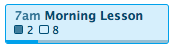
Let’s say you offer surf lessons, and each group lesson you offer has a total capacity of 10. This means that if 2 people book a morning lesson, the remaining capacity for that availability will be 8.

Now let’s say you use resources to manage your surfboards, and you only have 3 surfboards available for the morning lesson. If the 2 people who booked the morning lesson both need surfboards, then the remaining capacity will be 1 (even if the availability’s total capacity is 10), because there is only 1 surfboard left.

Additionally, if one more person books the same lesson, then the availability will be marked full, and no longer bookable to customers online.